YouCine TV App Review 2026: Is YouCine Safe? (+ 6 Better Free Apps)
YouCine is one of the most searched streaming apps right now, on phones, Android TV boxes and Roku. It promises free movies, series, anime and live sports. But is it safe to install? Our answer is no. Below we explain why, and show you 6 free apps that are legal, safe and often better.

Our verdict on YouCine
YouCine is an unofficial app that isn't on Google Play or the App Store. It streams content it doesn't have the rights to, and it's only available from random APK websites. That means no safety checks, no guarantee of what's inside the file, and legal risk. Free legal apps like Tubi, Pluto TV and Plex give you thousands of movies without any of these problems.
What is YouCine?
YouCine (also searched as "YouCine TV app") is an Android streaming app that shows movies, TV series, anime and live sports channels for free. It became very popular in Brazil, Latin America and parts of Africa, and many people install it on Android TV boxes.
The catch: YouCine doesn't license this content from Netflix, Disney, HBO, the studios or the sports leagues. The shows you see in the app belong to other companies, which is why you can't find YouCine on the Google Play Store. It's distributed through dozens of copy-cat "YouCine APK" websites instead.

Is YouCine safe? 5 risks you should know
- ❌ Not on official app stores. Google Play and the App Store scan apps for malware. YouCine skips that process entirely, so nobody has checked it.
- ❌ Dozens of fake "official" sites. Search "YouCine APK" and you'll find many sites, each claiming to be official. You can't know which file is original and which one was modified.
- ❌ Modified APKs are a common malware route. Unofficial APK files can hide adware, data-stealing code or apps that sign you up for paid services. Security companies regularly warn about this with free-movie apps.
- ❌ Pop-ups and risky ads. Apps and sites like this usually make money from aggressive pop-up and redirect ads, which can lead to scams.
- ❌ It can disappear any day. Unlicensed apps get shut down, change names, or stop working without warning. Many users report "YouCine not working" after updates.
Is YouCine legal?
YouCine streams movies, series and live sports without permission from the companies that own them. In most countries, including Brazil, the US, the UK and the EU, that's copyright infringement. Rights holders regularly take down sites and apps like this, and in some countries users of pirate streaming services have received warnings or fines.
The good news: you don't need it. The apps below are 100% free, fully legal, and paid for by short ads, just like regular TV.
6 best free legal alternatives to YouCine
All of these are free, licensed, and available on the official app stores. Availability depends on your country, so we note where each one works.

Tubi
Tubi has the biggest free movie library of any legal app, with Hollywood films, TV series and Spanish-language content. Owned by Fox Corporation, it has over 100 million monthly users. Ads are short and you don't even need to sign up.
Where it works: US, Canada, UK, Mexico, Australia, New Zealand and several Latin American countries.
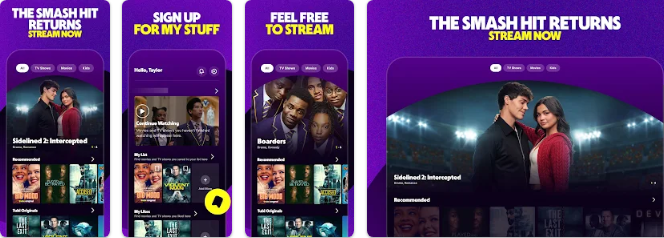
How to watch Tubi on phone, iPhone and PC
📱 Android phone or TV box
- Open the Google Play Store.
- Search for "Tubi: Free Movies & TV" and check the developer name matches the official one.
- Tap Install, then Open.
- Signing up is optional. Create a free account only if you want to save a watch list.
🍎 iPhone or iPad (iOS)
- Open the App Store.
- Search for "Tubi" and tap Get.
- Confirm with Face ID, Touch ID or your Apple ID password.
- Open the app. Signing up is optional. Create a free account only if you want to save a watch list.
💻 PC or Mac: easiest way (browser)
- Open Chrome, Edge or Safari.
- Go to tubitv.com.
- Signing up is optional. Create a free account only if you want to save a watch list.
No download is needed, which makes this the fastest and safest option on a computer.
🖥️ PC with BlueStacks (Android app on Windows)
- Download BlueStacks only from the official site, bluestacks.com.
- Run the installer and wait for BlueStacks to open.
- Sign in with your Google account when asked.
- Open the Play Store inside BlueStacks and search for "Tubi: Free Movies & TV".
- Click Install, then open the app from the BlueStacks home screen.
Tip: BlueStacks needs a reasonably modern PC. If it runs slowly, use the browser option instead.

Pluto TV
If you liked YouCine's live channels, Pluto TV is the closest legal match. It works like free cable TV, with hundreds of channels for movies, series, news, anime and kids, plus an on-demand library. It's also available in Brazil and many other countries.
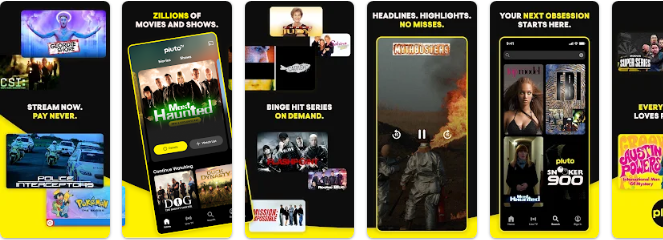
How to watch Pluto TV on phone, iPhone and PC
📱 Android phone or TV box
- Open the Google Play Store.
- Search for "Pluto TV" and check the developer name matches the official one.
- Tap Install, then Open.
- No account is needed. Open the Live tab for channels or On Demand for movies.
🍎 iPhone or iPad (iOS)
- Open the App Store.
- Search for "Pluto TV" and tap Get.
- Confirm with Face ID, Touch ID or your Apple ID password.
- Open the app. No account is needed. Open the Live tab for channels or On Demand for movies.
💻 PC or Mac: easiest way (browser)
- Open Chrome, Edge or Safari.
- Go to pluto.tv.
- No account is needed. Open the Live tab for channels or On Demand for movies.
No download is needed, which makes this the fastest and safest option on a computer.
🖥️ PC with BlueStacks (Android app on Windows)
- Download BlueStacks only from the official site, bluestacks.com.
- Run the installer and wait for BlueStacks to open.
- Sign in with your Google account when asked.
- Open the Play Store inside BlueStacks and search for "Pluto TV".
- Click Install, then open the app from the BlueStacks home screen.
Tip: BlueStacks needs a reasonably modern PC. If it runs slowly, use the browser option instead.

Plex
Plex offers free on-demand movies and live TV channels in over 200 countries, so it's a great choice if Tubi isn't available where you live. Libraries vary by country.
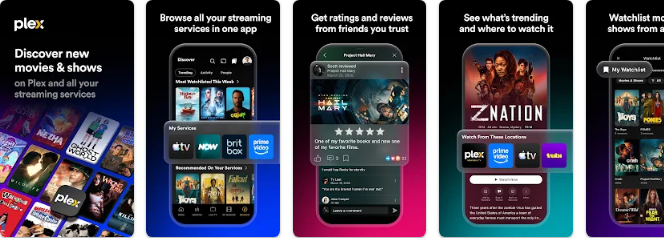
How to watch Plex on phone, iPhone and PC
📱 Android phone or TV box
- Open the Google Play Store.
- Search for "Plex" and check the developer name matches the official one.
- Tap Install, then Open.
- You may be asked to create a free Plex account. Then open Movies & Shows or Live TV.
🍎 iPhone or iPad (iOS)
- Open the App Store.
- Search for "Plex" and tap Get.
- Confirm with Face ID, Touch ID or your Apple ID password.
- Open the app. You may be asked to create a free Plex account. Then open Movies & Shows or Live TV.
💻 PC or Mac: easiest way (browser)
- Open Chrome, Edge or Safari.
- Go to watch.plex.tv.
- You may be asked to create a free Plex account. Then open Movies & Shows or Live TV.
No download is needed, which makes this the fastest and safest option on a computer.
🖥️ PC with BlueStacks (Android app on Windows)
- Download BlueStacks only from the official site, bluestacks.com.
- Run the installer and wait for BlueStacks to open.
- Sign in with your Google account when asked.
- Open the Play Store inside BlueStacks and search for "Plex".
- Click Install, then open the app from the BlueStacks home screen.
Tip: BlueStacks needs a reasonably modern PC. If it runs slowly, use the browser option instead.

The Roku Channel
Searching "YouCine Roku"? There's no official YouCine app on Roku, but The Roku Channel is built in, free, and full of movies, series and live channels. It also works on the web and on phones.

How to watch The Roku Channel on phone, iPhone and PC
📱 Android phone or TV box
- Open the Google Play Store.
- Search for "The Roku Channel" and check the developer name matches the official one.
- Tap Install, then Open.
- You don't need a Roku device. Some content may ask you to sign in with a free Roku account.
🍎 iPhone or iPad (iOS)
- Open the App Store.
- Search for "The Roku Channel" and tap Get.
- Confirm with Face ID, Touch ID or your Apple ID password.
- Open the app. You don't need a Roku device. Some content may ask you to sign in with a free Roku account.
💻 PC or Mac: easiest way (browser)
- Open Chrome, Edge or Safari.
- Go to therokuchannel.roku.com.
- You don't need a Roku device. Some content may ask you to sign in with a free Roku account.
No download is needed, which makes this the fastest and safest option on a computer.
🖥️ PC with BlueStacks (Android app on Windows)
- Download BlueStacks only from the official site, bluestacks.com.
- Run the installer and wait for BlueStacks to open.
- Sign in with your Google account when asked.
- Open the Play Store inside BlueStacks and search for "The Roku Channel".
- Click Install, then open the app from the BlueStacks home screen.
Tip: BlueStacks needs a reasonably modern PC. If it runs slowly, use the browser option instead.

Kanopy
Kanopy is completely ad-free. Sign in with a public library or university card and watch classic, indie and award-winning films for free.
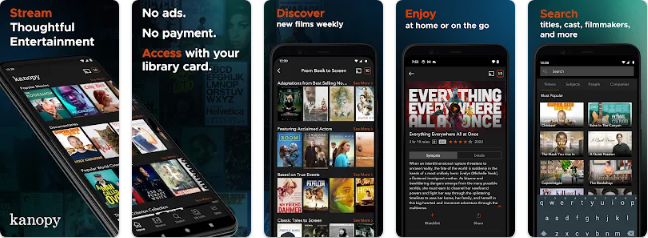
How to watch Kanopy on phone, iPhone and PC
📱 Android phone or TV box
- Open the Google Play Store.
- Search for "Kanopy" and check the developer name matches the official one.
- Tap Install, then Open.
- Tap Add library, search for your public library or university, and sign in with your card number.
🍎 iPhone or iPad (iOS)
- Open the App Store.
- Search for "Kanopy" and tap Get.
- Confirm with Face ID, Touch ID or your Apple ID password.
- Open the app. Tap Add library, search for your public library or university, and sign in with your card number.
💻 PC or Mac: easiest way (browser)
- Open Chrome, Edge or Safari.
- Go to kanopy.com.
- Tap Add library, search for your public library or university, and sign in with your card number.
No download is needed, which makes this the fastest and safest option on a computer.
🖥️ PC with BlueStacks (Android app on Windows)
- Download BlueStacks only from the official site, bluestacks.com.
- Run the installer and wait for BlueStacks to open.
- Sign in with your Google account when asked.
- Open the Play Store inside BlueStacks and search for "Kanopy".
- Click Install, then open the app from the BlueStacks home screen.
Tip: BlueStacks needs a reasonably modern PC. If it runs slowly, use the browser option instead.

YouTube (Free movies)
YouTube has a "Movies & TV" section with full films uploaded legally by studios, free with ads. Availability depends on your country.
How to watch YouTube on phone, iPhone and PC
📱 Android phone or TV box
- Open the Google Play Store.
- Search for "YouTube" and check the developer name matches the official one.
- Tap Install, then Open.
- Open the Movies & TV section and look for titles marked "Free with ads".
🍎 iPhone or iPad (iOS)
- Open the App Store.
- Search for "YouTube" and tap Get.
- Confirm with Face ID, Touch ID or your Apple ID password.
- Open the app. Open the Movies & TV section and look for titles marked "Free with ads".
💻 PC or Mac: easiest way (browser)
- Open Chrome, Edge or Safari.
- Go to youtube.com/feed/storefront.
- Open the Movies & TV section and look for titles marked "Free with ads".
No download is needed, which makes this the fastest and safest option on a computer.
🖥️ PC with BlueStacks (Android app on Windows)
- Download BlueStacks only from the official site, bluestacks.com.
- Run the installer and wait for BlueStacks to open.
- Sign in with your Google account when asked.
- Open the Play Store inside BlueStacks and search for "YouTube".
- Click Install, then open the app from the BlueStacks home screen.
Tip: BlueStacks needs a reasonably modern PC. If it runs slowly, use the browser option instead.
YouCine vs the alternatives
| App | Price | Legal | On Google Play | Malware risk | Live TV |
|---|---|---|---|---|---|
| YouCine | Free | No | No | High | Yes |
| Tubi | Free | Yes | Yes | Low | Some |
| Pluto TV | Free | Yes | Yes | Low | Yes |
| Plex | Free | Yes | Yes | Low | Yes |
| The Roku Channel | Free | Yes | Yes | Low | Yes |
| Kanopy | Free* | Yes | Yes | Low | No |
| YouTube | Free | Yes | Yes | Low | Some |
*Kanopy needs a free library or university card.
YouCine on TV Box, Roku and Fire TV: what to install instead
Many people search for "YouCine TV Box" or "YouCine Roku" because they want free content on the big screen. Here's what to install instead:
- Android TV Box / Google TV: install Tubi, Pluto TV or Plex directly from the Google Play Store on the box. No APK files needed.
- Roku: open The Roku Channel (built in), or add Tubi, Pluto TV and Plex from the Roku Channel Store.
- Amazon Fire TV / Firestick: search for Tubi, Pluto TV or Plex in the Amazon Appstore.
- Smart TVs (Samsung, LG): most of these apps are in your TV's app store. Samsung TVs also include Samsung TV Plus for free.
YouCine APK mod for TV Box and YouCine account: the risks
Many people search for a "YouCine APK mod TV Box" version that removes ads or unlocks VIP. Modified APKs are even riskier than the normal YouCine APK: someone you don't know has changed the code, and there's no way to check what they added. On a TV box connected to your home Wi-Fi, that can expose other devices on your network too.
The same goes for a YouCine account. Some versions ask you to sign up or sign in inside the YouCine mobile APK. Never reuse a password you use for email, banking or social media there, because an unofficial app has no obligation to protect your data. If you already did, change that password now.
Frequently asked questions
Is YouCine safe?
No. YouCine isn't on Google Play or the App Store, so it isn't checked for malware. It's spread through many unofficial APK sites, and you can't verify which file is genuine.
Is YouCine legal?
YouCine streams movies, series and sports without licences from their owners, which is copyright infringement in most countries.
Is there an official YouCine app for Roku or TV Box?
No. There is no YouCine app in the Roku Channel Store or Google Play. Use Tubi, Pluto TV, Plex or The Roku Channel instead, which are all available officially.
Does YouCine have Netflix content?
YouCine shows titles from Netflix and other services without permission. If you want Netflix shows legally, you need a Netflix plan. For free legal content, use the apps in our list.
Why is YouCine not working?
Unofficial apps often break after updates or when their servers are taken down. This is one more reason to switch to a stable, legal app like Tubi or Pluto TV.
Do I need a YouCine account?
Some YouCine versions ask you to create an account or sign in. Because YouCine is unofficial, we don't recommend giving it your email or a reused password. Legal apps like Tubi and Pluto TV work without any account.
Is it safe to sign in to the YouCine mobile APK?
No. There is no way to know how an unofficial APK stores your login details. If you signed in with a password you use elsewhere, change it.
Is the YouCine APK mod for TV Box safe?
No. Modified ("mod") APKs are changed by unknown people and are one of the most common ways malware reaches Android TV boxes.
What is the best free alternative to YouCine?
Tubi is the best overall, Pluto TV is best for live channels, and Plex is best if you live outside the US and Latin America.
Bottom line
YouCine looks free, but you pay with risk: unknown APK files, possible malware, and legal problems. Install Tubi or Pluto TV from the official store instead. It takes one minute and it's 100% free and safe.